A Notebook-Style Calendar That Doesn't Feel Like Spreadsheet Software
By PlanJour team, Sparklithic Ltd · Published · Updated
Most calendar apps look like a spreadsheet with dates stuck on it. PlanJour's calendar is built to feel like a notebook instead, stickers, colour and all.
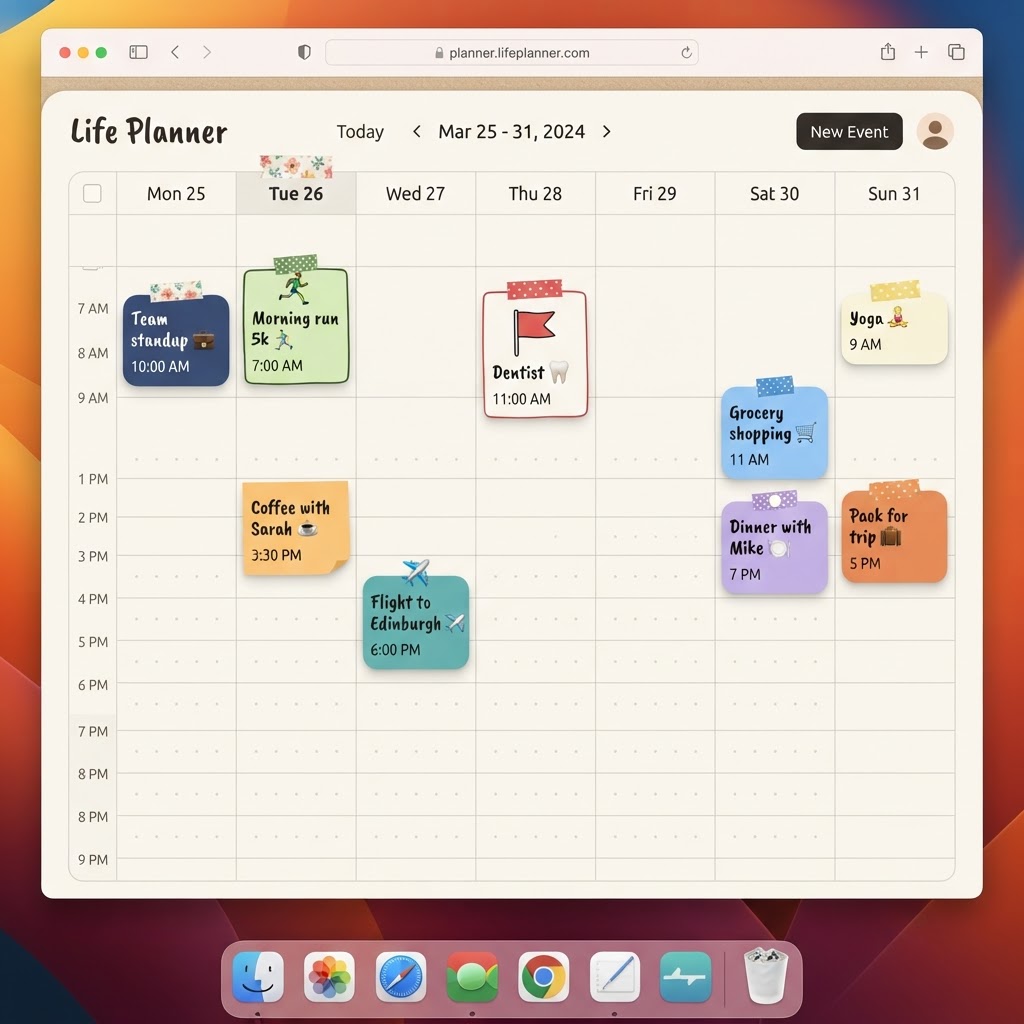
Why most calendar apps feel like work
Open a typical calendar app and you get grey grid lines, tiny grey text, and events that all look the same regardless of what they are. It works, technically. It also does nothing to make planning your day feel good, and for a tool you open dozens of times a week, that flatness adds up.
PlanJour's calendar was built on a simple idea: a calendar is something you'll use every single day, so it should feel more like a favourite notebook than an internal business tool.
Sticky notes, pills, flags and doodle boxes
Instead of one rigid event style, PlanJour gives every event a shape. A quick reminder can sit as a small pill. A longer commitment can spread out as a sticky note. Something you want to stand out can be a flag. It sounds like a small detail, but it changes how a week actually reads at a glance, busy days look busy, quiet days look quiet, and the shape of your week becomes something you can feel rather than something you have to parse.
On top of shape, every event can carry an emoji sticker, so a coffee catch-up, a gym session, and a dentist appointment are visually distinct before you even read the title.
Colour that means something
Categories in PlanJour aren't an afterthought, they're core to how the calendar reads. Work, Health, Social, Personal, Travel and more each get their own colour, and you can add your own categories on top. Glance at a week and you can tell, colour by colour, whether it's overloaded with work or actually has room for the things that matter outside it.
Agenda, Day, Week and Month, all the same calendar
Under the playful surface, PlanJour is a genuinely capable calendar. Switch between Agenda, Day, Week and Month views depending on what you need. Drag and drop events to reschedule them in seconds. Set events to repeat daily, weekly or monthly without recreating them each time. Add a reminder and get an email before it starts.
None of that power comes at the cost of the notebook feel, it's just built underneath it.
A calendar and a journal, not two apps
What makes PlanJour different from a standalone calendar app is what sits right next to it: a full daily journal on the same page. Your completed events can turn into that day's wins without any extra typing. That's the part most calendar apps never even attempt.
If your calendar has started to feel like just another chore app, start free and see what a week looks like when it's actually designed to be looked at.