PlanJour for personal trainers
A calendar for personal trainers and coaches
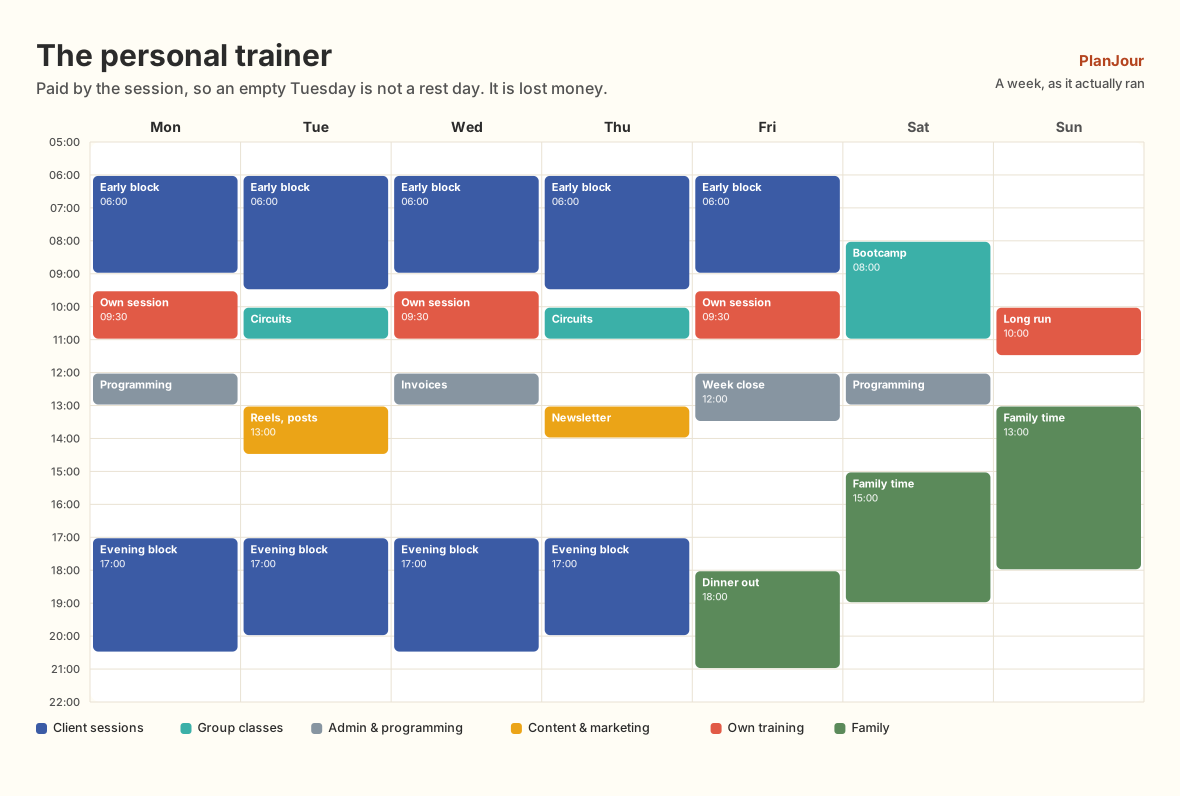
Paid by the session, so an empty Tuesday is not a rest day. It is lost money.
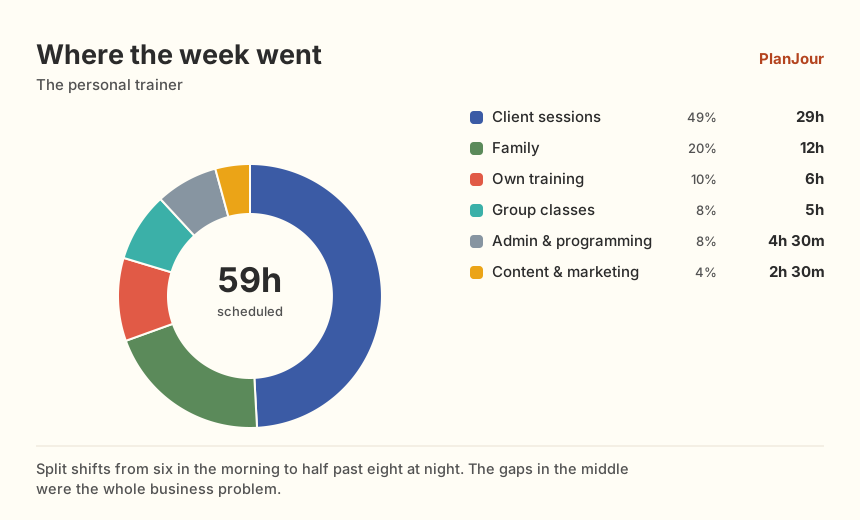
29 hours with clients. 2h 30m finding the next ones.
| Category | Hours | Share |
|---|---|---|
| Client sessions | 29h | 49% |
| Family | 12h | 20% |
| Own training | 6h | 10% |
| Group classes | 5h | 8% |
| Admin & programming | 4h 30m | 8% |
| Content & marketing | 2h 30m | 4% |
| Scheduled that week | 59h |
The split shift is the business problem
Sessions cluster at either end of the day because that is when clients are free. The result is a week that starts at six in the morning and finishes at half past eight at night with a dead zone in the middle of every single day. Drawn on a grid it is unmistakable, and it is the first thing worth solving, not by working more but by deciding deliberately what the middle of the day is for.
Marketing is the hour you never book
Two and a half hours of content and marketing in a 59-hour week. That is the number that decides whether next quarter is full, and it is the one that loses every argument against a client who wants to move to Thursday. Giving it a category does not create the time, but it does make the trade visible at the moment you make it.
Your own training counts
Six hours, and it is the thing most trainers cut first and feel worst about. It is also, uniquely in this job, part of the product. Scheduling it as real committed time rather than "if there is a gap" is the difference between a habit and an intention.
Where the money actually is
Twenty-nine hours of one-to-one against five of group classes. Group work is the only line on this chart that scales past the number of hours in a day, which makes the ratio between those two categories the most strategically interesting number on the page.
Setting this up between two clients
Put your standing sessions in as recurring series first; for most trainers that is the bulk of the week and it takes ten minutes. Then add the categories that are not sessions: Programming, Marketing, Own training. The last two are the ones that matter, because they are what gets sacrificed and what nobody records. Block the dead zone in the middle of the day as something rather than leaving it empty. Even if the something is rest, naming it stops it being accidentally filled. After a fortnight, look at the ratio of one-to-one against group work, which is the number that decides whether the business can grow past the hours in your day.
What does the work here
Week view
The split-shift shape is invisible in a list and obvious on a grid.
Recurring client sessions
Standing appointments entered once, moved individually when they move.
Custom categories
Separating marketing from admin is how you find out you are doing two and a half hours of it.
Allocation view
One-to-one against group, over a quarter rather than a week.
Where PlanJour is the wrong choice
PlanJour is not a booking system, a payment processor or a client CRM. It will not send a client a reminder or take their money. It shows you your own week, which is a different job and the one most booking tools do badly.
Questions
- Can clients book into my calendar?
- No. PlanJour has no public booking page and does not take payments. If you need client self-booking, use a booking tool and subscribe PlanJour to its calendar feed so your own week stays complete.
- Can I see which clients take the most time?
- Give recurring clients their own category and the allocation view totals them over any range. For a dozen regulars that works well; for fifty it becomes unwieldy and a proper CRM is the better answer.
- Does it work on a phone between sessions?
- Yes. It runs in the browser, installs to a phone home screen, and quick-add takes a few seconds. There is also an iOS app.
Other people, other weeks
Your week, as it actually ran.
Start free