PlanJour vs Google Calendar: Which One Actually Fits How You Plan?
Google Calendar is free and everywhere, but it only does one job. Here's an honest look at how PlanJour compares for anyone who also wants to journal.
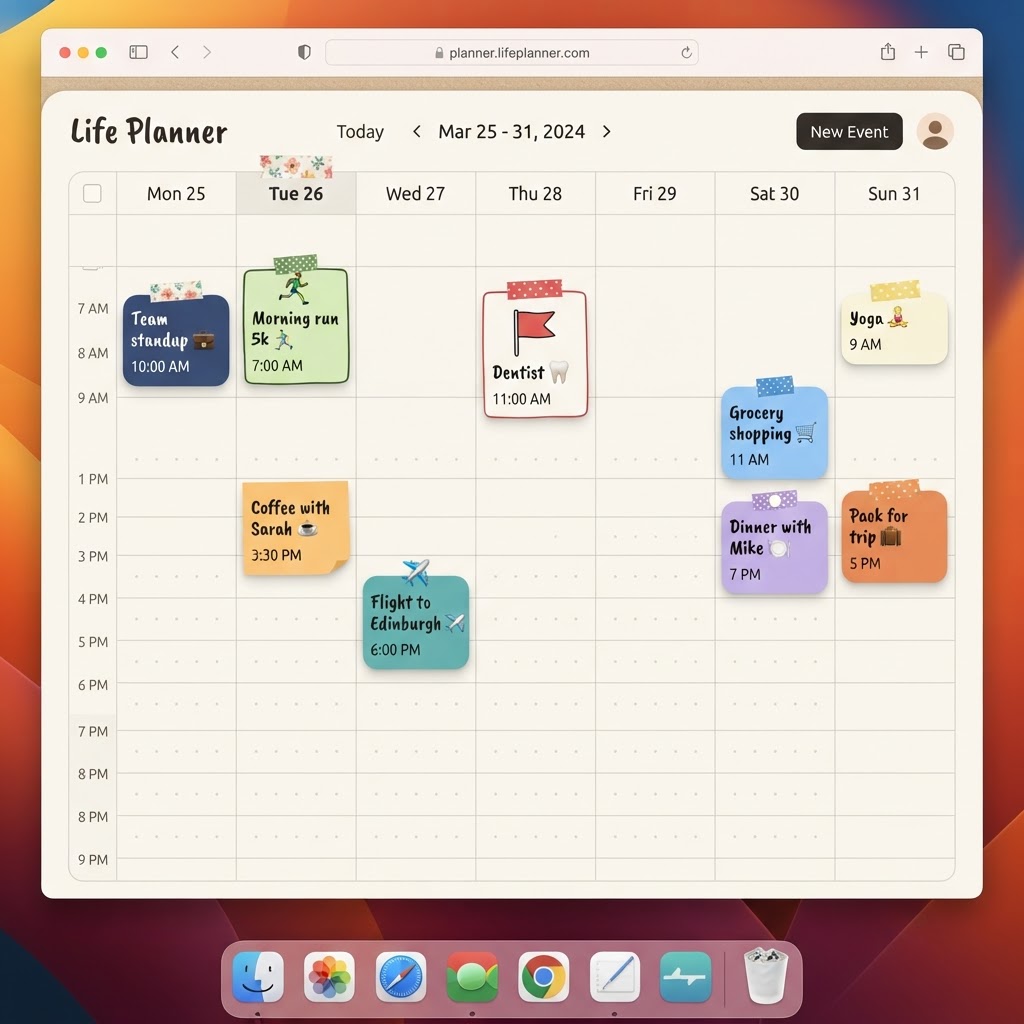
Google Calendar is probably the most-used calendar app in the world, and for good reason. It is free, it syncs across every device, it plugs into Gmail and Google Meet, and almost everyone you schedule with already has one. If all you need is a place to put appointments, it does that job well.
PlanJour is not trying to be a bigger, better Google Calendar. It is a different kind of tool built around a different question: what if your calendar and your journal lived in the same place, styled like an actual notebook instead of a spreadsheet?
Where Google Calendar wins
Be honest about this part first. Google Calendar is free for personal use, with no subscription tier at all. It syncs instantly across every device you own, integrates deeply with Gmail, Google Meet and dozens of third-party tools, and supports team/shared calendars at a scale PlanJour was never built for. If your main need is coordinating meetings across an organisation, Google Calendar (or its Workspace tier) is the right tool.
It also has zero learning curve for most people, since almost everyone has already used it.
Where PlanJour is a different tool entirely
Google Calendar has no journal. That is not a missing feature so much as a different premise: it was built to schedule time, not to reflect on it. If you want to note how a day actually felt, what you were grateful for, or track a mood alongside your mood, you need a second app, and that second app rarely talks to your calendar.
PlanJour puts a full daily journal on the same page as the day's events: mood and weather stickers, a gratitude prompt, a free-write space, and a habit checklist, all one tap away from whatever you had scheduled that day. The idea is that reflection happens more often when it is not a separate app you have to remember to open.
The calendar side is also deliberately warmer than a grid of boxes. Events get stickers, colour categories and doodle shapes instead of plain rectangles, and you can design your own journal cover the way you would pick out a physical notebook.
Sync and sharing
Google Calendar's cross-device sync is close to instant and works across any platform. PlanJour syncs across your own devices too, and if you want your Google or Apple calendar events to show up alongside your PlanJour ones, calendar sync pulls them in as read-only so you are not maintaining two calendars by hand. Whole-calendar sharing lets a partner or family member see your schedule without needing their own Google account tied to it.
Price
Google Calendar is free, full stop, for personal use. PlanJour's core calendar and 7-day journal history are also free to start. PlanJour Plus is £4.99 a month or £34.99 a year and adds recurring events, reminders, calendar sync, unlimited journal history and PDF export, see the full comparison.
Which one is right for you
If you only need to schedule meetings and never think about journaling, Google Calendar remains the simplest, most universal choice, and PlanJour is not trying to win that fight. If you have ever kept a calendar in one app and a journal in another and noticed the journal is always the one you forget to open, that is specifically the gap PlanJour was built to close.
Start free with PlanJour and see whether having both in one notebook changes anything, or keep using Google Calendar for scheduling and add PlanJour's journal side alongside it. Plenty of people do both.
Things that might help
Hand-picked by us and relevant to this article. Some are affiliate links, which means we may earn a small commission at no extra cost to you. We never use your journal, mood, habits or calendar to decide what appears here.

Audible
Affiliate linkHear something fascinating with our newest plan. Choose anything you want from our entire collection of 900,000 titles before your plan renews unused monthly selections won’t roll over to the next month.
Start Free 30 Day Trial
Skill Share
Creative Classes Taught by the Best Creative Pros. Stay Inspired Discover trending topics, get quick answers, and find your people.
Find your classKeep reading
- How do I build a bedtime journaling habit that actually survives busy weeks?Bedtime journaling is one of the first habits to drop during a busy stretch. Here's how to make it durable enough to survive one anyway.
- What's the best calendar color-coding system for someone juggling three roles (work, parent, side project)?Juggling multiple roles on one calendar gets messy fast without a deliberate color system. Here's a simple three-role setup that actually stays legible.
- How do I know if I actually need PlanJour Plus or if the free plan is enough?Not everyone needs to upgrade, and it's worth being honest about when the free plan is genuinely enough. Here's how to tell.